
1. Install the plugin
Upload the WPPulso ZIP in WordPress, activate it and open the WPPulso dashboard. The plugin runs on the site where you install it.
How it works
Install the WPPulso plugin, run a manual scan and review the results inside WordPress. Pro and Agency plans add monitoring, licences, billing records and support workflows.
Plugin workflow
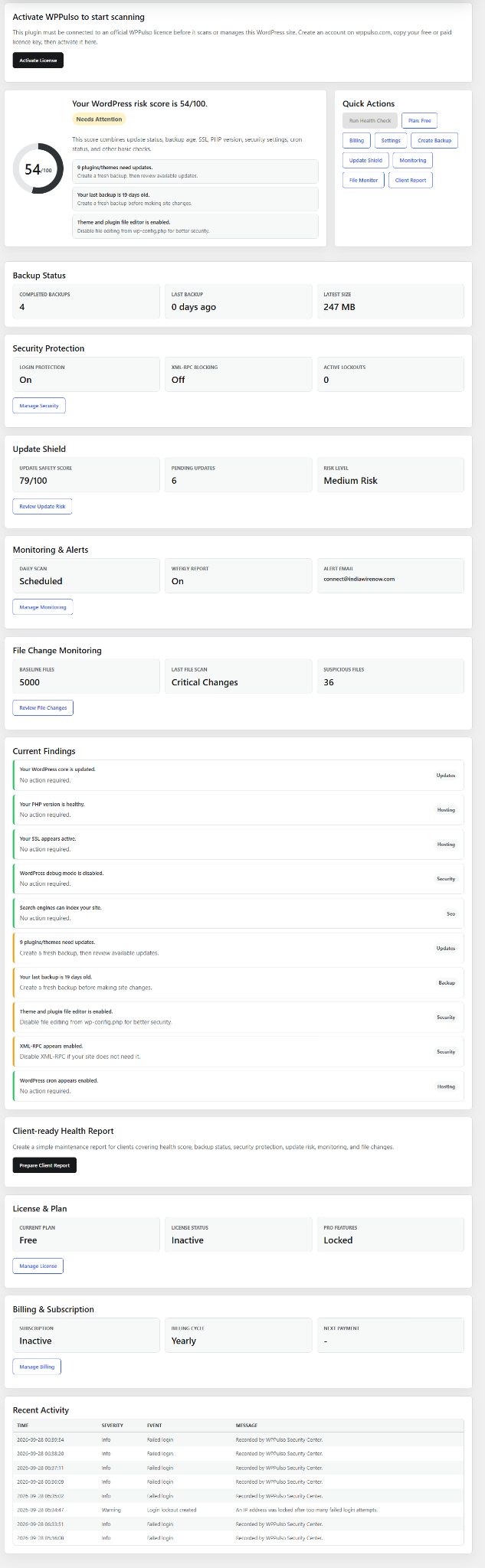
The available v1.2.4 plugin runs checks locally inside WordPress. Pro and Agency workflows extend this with account-level monitoring and support.
Upload the WPPulso ZIP in WordPress, activate it and open the WPPulso dashboard. The plugin runs on the site where you install it.
Review the health score, updates, backup status, PHP, SSL, cron and available security checks. The website scan checklist does not perform this scan.
Use the checklist to decide what needs attention. Updates, backups, review and escalation tools can make changes, so review the action and keep an independent backup.
Use Pro or Agency when you need account-level uptime monitoring, vulnerability alerts, multi-site management and client reporting.
Risk workflow
Use this order before making changes on a live WordPress site.
Check whether the issue affects one plugin, one file, the database, hosting, SSL, backups or uptime.
Avoid bulk updates, file deletion or database changes until backup status is confirmed.
Save the scan result, file path, plugin version, time and recent changes for support or your developer.
Use support for licence, billing or critical security concerns; use a specialist for active compromise.
Safe scanning
The manual scan reads site signals, but other plugin tools can create backups, update settings or flag selected files for manual review. Review each action and keep a separate backup.
No. The website checklist is local to your browser. Install the plugin and run Manual Scan in WordPress for actual site findings.
The plugin includes report tools. Review the generated report in your installed version and share it using a method you trust.
Prioritize vulnerabilities, stale backups, failed SSL, downtime, broken cron and high-risk updates before cosmetic or low-priority warnings.