
Owner question
Understand which WordPress core, plugin and theme updates need extra care before applying them on a live site.
Update Risk Scoring
Score updates based on type, age, known risk and site sensitivity.
Pro/Agency account feature: this adds hosted monitoring, account workflow or client reporting on top of the downloadable plugin.
How this helps
WPPulso turns this check into an owner-friendly status, so a business owner can decide whether to ignore, monitor, fix, or escalate.
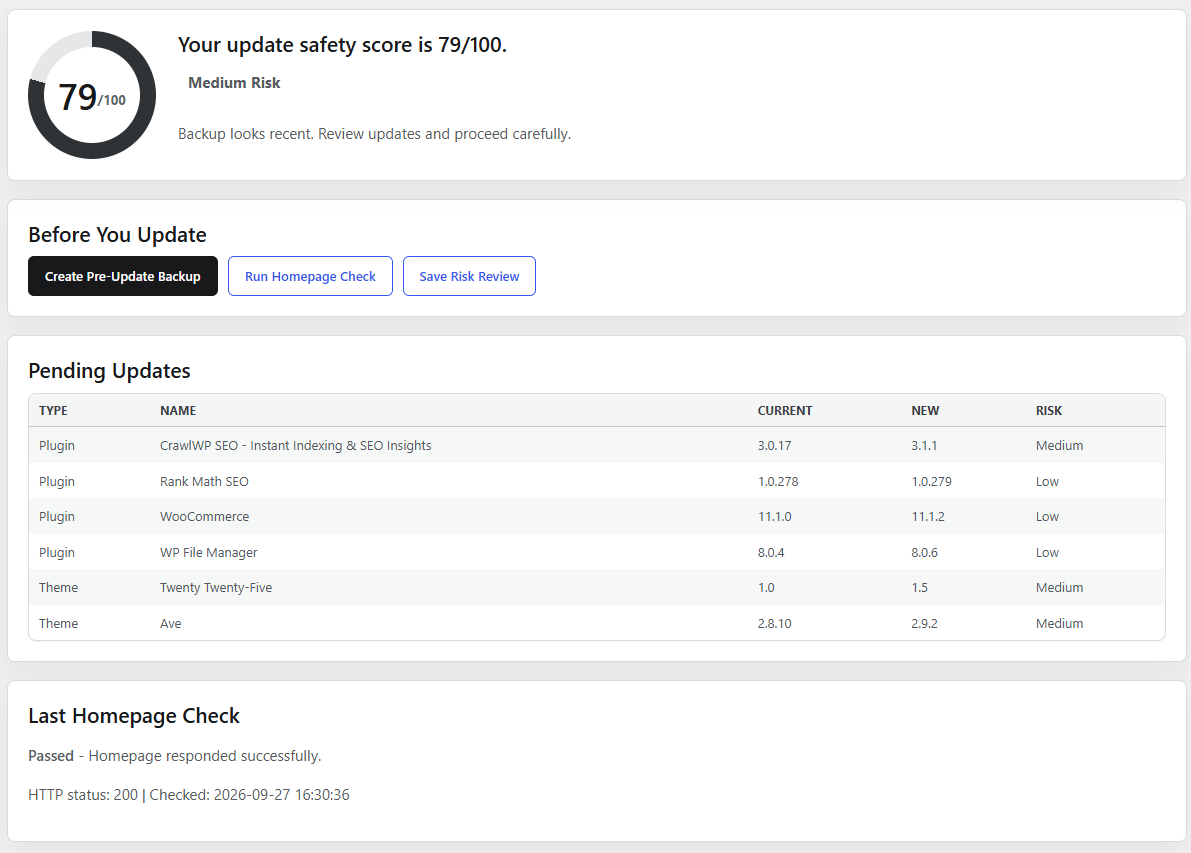
Plugin screenshot
This screenshot shows the actual WPPulso plugin interface for this workflow or a closely related plugin screen.
Understand which WordPress core, plugin and theme updates need extra care before applying them on a live site.
Score updates based on type, age, known risk and site sensitivity.
Review the signal, confirm whether it is urgent, then fix it yourself or share the report with your developer.
Risk note
This feature can surface important warnings, but the safest action depends on backup status, business impact and what changed recently. Do not delete, update, review or escalation only because a warning exists.
Confirm a recent independent backup before changing files, plugins, themes or database content.
Ask whether the issue affects login, checkout, forms, bookings, SEO or client trust.
Use support, your developer or a malware specialist when the finding is critical or unclear.